Work your team delivered that never made it onto an invoice.
Time gets logged, the invoice goes out, and somewhere between the two a few hours drop off or bill at the wrong rate. The free Revenue Leakage Check reads your own time and invoice exports and shows you where.
Start with one export. Your files stay in your browser.

What you see
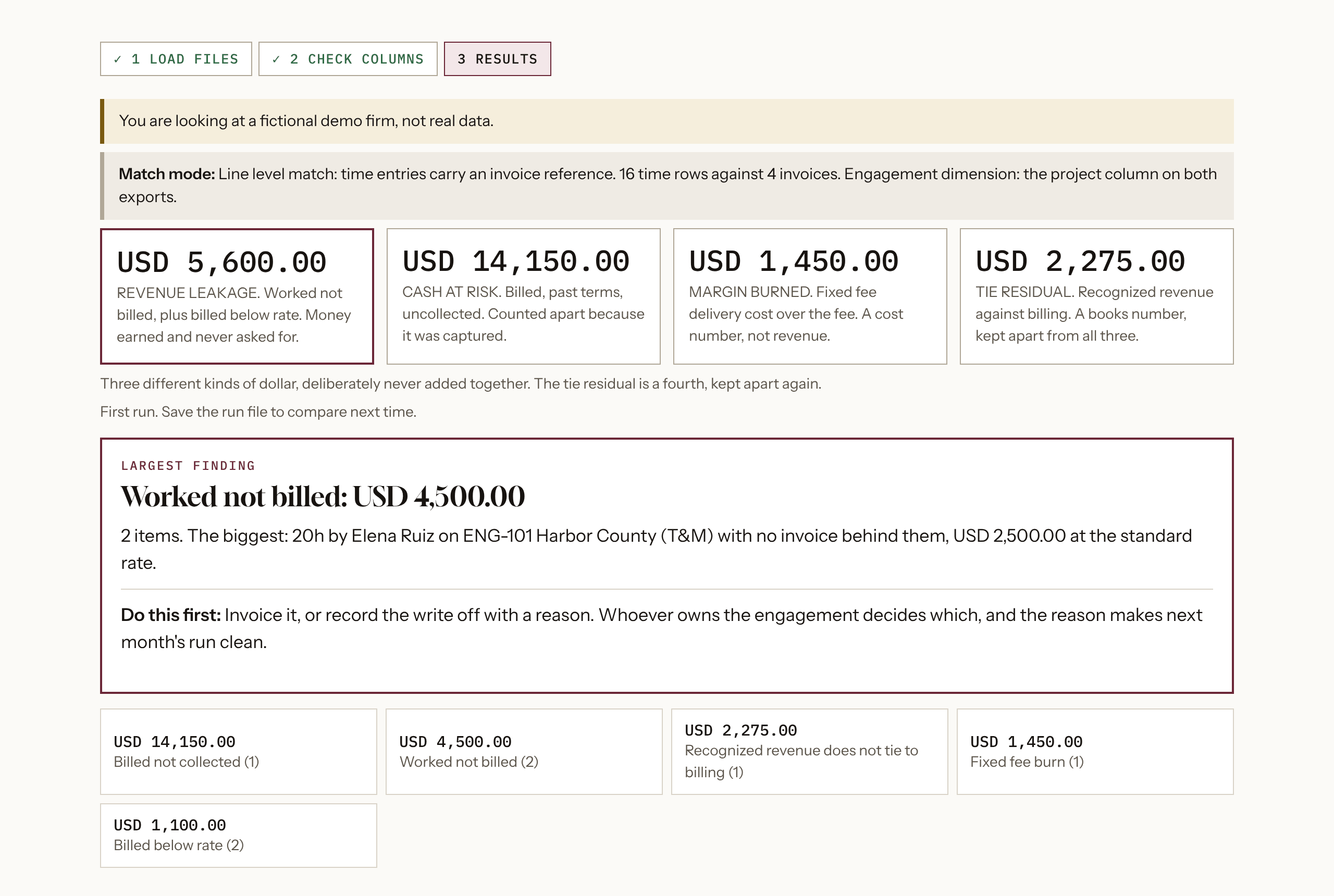
The results screen, run on the fictional demo firm that ships with the Check. Your own run uses your exports.
In their words
We asked 120 people at firms of 20 to 500 employees what was going wrong in their finance work. 64 of the 120 said work had gone out unbilled or at the wrong rate.
Three of them, in their own words:
“Growing the firm's headcount and project load without updating in operational systems”
“QuickBooks was not matching up to the invoicing software we used, we hired someone to automate the connection”
“AR has been off for 5 months so outside consultants were needed.”
Who it is for
Firms of 20 to 500 employees that bill for time. Consultancies, agencies and other services firms where hours are logged against engagements and then invoiced.
Whoever owns billing or the close. A controller, finance lead or billing lead who can run their own exports without asking IT.
What to bring
One export gets you started. Your invoice register on its own shows cash at risk, grouped by how long each invoice has waited.
Add your time entries and an hourly rate to see unbilled work. If your export carries no rates, you type one.
Three optional files switch on more. An engagement list, a rate card and a period summary each add a check.
On QuickBooks Online, run Invoice List by Date and Time Activities by Employee Detail.
What it gives you back
Which figures you get depends on what you load, and they are kept apart and never added together. The invoice register alone gives one, an hourly rate and your time export make it two, and margin burned needs cost data most firms do not export.
Revenue leakage. Hours worked and never billed, priced at your rate. Where your time entries carry invoice numbers, it also finds hours billed below the agreed or standard rate.
Cash at risk. Invoices past due, grouped by how long they have waited. This is the one figure that needs only your invoice register.
Margin burned. On fixed-fee work, cost already over the fee. It runs only when your time export carries cost rates and an engagement list gives each fixed fee.
When a figure cannot run, its tile says Not run and tells you what would switch it on. It never shows a zero where it did not look.
If your files carry no hourly rates, the Check asks you to type one. It prices every unbilled hour at your number and says so on the results screen, because that figure then rests on your assumption.
With a period summary loaded, it also checks whether recognized revenue ties to what was billed, and shows the gap on its own as the tie residual. It flags duplicate invoice numbers and invoices with no time behind them. Write-offs with a recorded reason are listed apart and never counted as leakage.
You can download the findings, a collections list and a one-page summary. Save the run file and load it next month to see what changed.
What stays with you, and what is shared
Your files stay in your browser. The Check reads them on your own machine. Your exports are never uploaded, and Saintilco does not store them.
It only reads. Exports go in, nothing is written back to your billing tool, time system or ledger, and the Check never logs in to anything.
You see the whole result before anyone asks for your email. No form or sign-up stands between you and the figures.
After that, sharing is your choice. If you want the result and a suggested next step sent to you, enter your email. Saintilco receives your email address, and the result summary only if you tick the box to include it. Your exports are never sent.
What it is not
It is a check you run on your own data. It reports what your exports show and does not test whether the work happened.
The figures are from your files, not a finding about your firm. A person still has to look at each item before money moves.
When the figures are real
If the Check turns up unbilled work, the natural next step is the Unbilled Work Review. Saintilco works from the same kind of exports for one week and you get a written fix list.
The results screen names the next step that fits the files you loaded.
Questions
What does it cost?
Nothing. It is a free tool.
Which systems does it work with?
Any time system and invoicing tool that can export to a spreadsheet. You match your column names to the Check's fields once, and the run file carries your choices to next time.
Do you need access to our systems?
No. You run the exports yourself and the Check reads them in your browser.
Do I have to give my email?
No. You see the full result first. Sending it to yourself is optional.
Do I need to know our hourly rate?
Only for the unbilled work figure, and only if your files carry no rates. Type one hourly rate and the Check uses it, and labels the result as resting on it.
Why do I only see one figure?
Because you loaded the invoice register on its own, or your time export has no rates. Each figure that did not run says what would switch it on.
Can I run it again next month?
Yes. Save the run file, load it with your new exports, and the Check shows what is new, what you fixed and what is still open.
Does it fix anything?
No. It shows you where to look, and your team decides what to change.
Questions first? Talk to Saintilco.